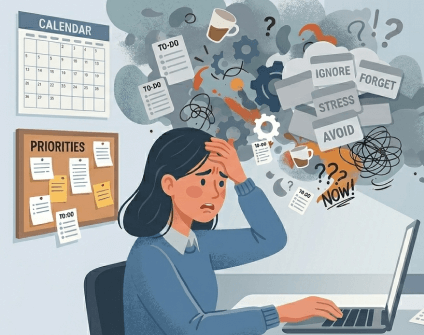
It is Monday morning. You download a new productivity app, spend a satisfying hour setting it up perfectly, adding every task you can think of, and telling yourself this is the one. By Wednesday you have not opened it once.
If you have ADHD, this probably feels familiar, in a slightly frustrating way. Most productivity apps were built for a different kind of focus. You work differently, and once you understand exactly how, everything starts to make a lot more sense.
The Struggles of ADHD in Task Management
- Starting is the real friction. There’s often this strange gap between deciding to do something and actually beginning it. If there’s no urgency, interest, or external pressure, a task can just sit there completely untouchable.
- Prioritization falls apart. Everything can feel urgent at the same time, which somehow results in nothing getting done. A small, low-impact task can quietly take over the whole day simply because it’s easier to think about.
- Task switching costs real energy. Moving between things isn’t just a mental click. It takes real effort to “re-enter” focus. That’s where you see both extremes: long stretches of hyperfocus where it’s hard to stop, or avoidance where starting something new feels oddly heavy, so you delay it.
- Reminders stop working. A notification appears, but if you’re already absorbed in something else, it’s basically gone in seconds. Most systems assume attention is stable. ADHD doesn’t really work that way.
- The emotional weight adds up. After enough missed deadlines or abandoned plans, even opening a task app can feel less like organizing your life and more like confronting everything that didn’t go to plan. That part quietly matters more than people admit.
What helps is an external structure that handles what focus cannot do alone. A system where starting and staying on track is easy, and what comes next is always obvious. That is exactly what the right task management tool can do.

How Planndu Can Help
Color Coding
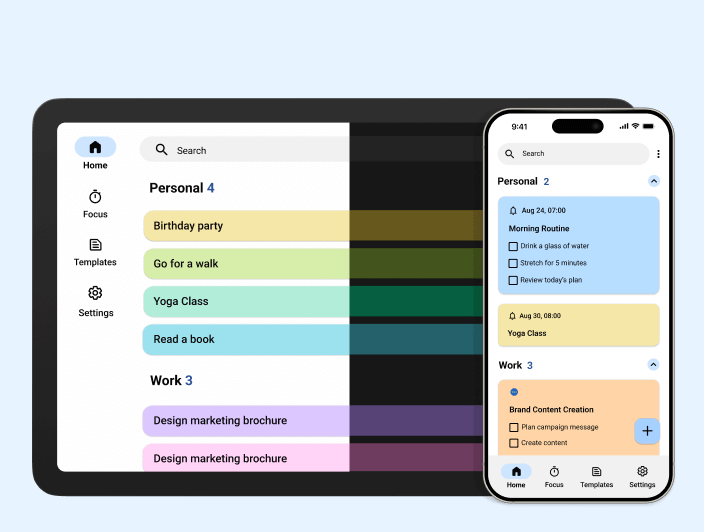
When every task looks identical, you have to read and evaluate each one just to understand what you are looking at. Planndu’s color-coding lets you scan the whole list in seconds.
I set mine up so that at work, anything critical is red and ideas I want to explore are purple. In my personal life, yoga and pilates are blue so I can spot them instantly and protect that time, and appointments are orange so they never blend into the rest of the day. I open my list and before I read a single word, I already know what kind of day I am walking into.
A good tip to start: do not try to color everything at once. Pick two or three categories that matter most to you right now and build from there. It only works if it feels natural, not like another thing to maintain.
Priority and Status
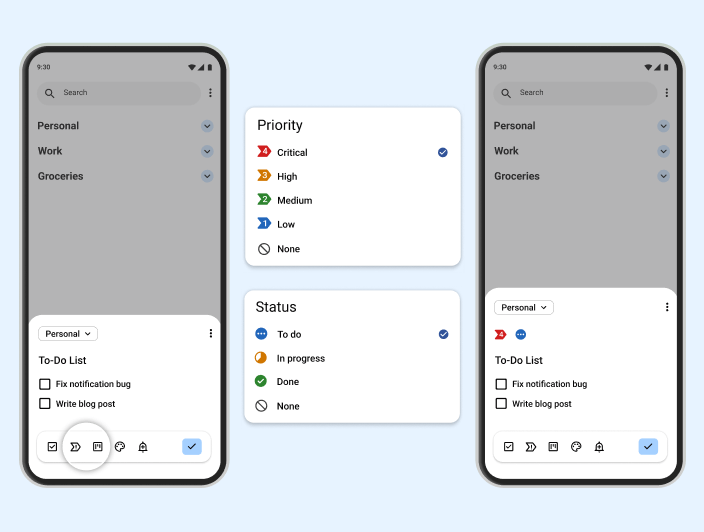
Each priority level has a number and a color so there is zero guessing. You see a 4 and you know that is critical, handle it now. You see a 1 and you know it can wait. And right next to it, the status icon tells you exactly where that task lives. In progress, To do or Done.
So instead of reading a task and then thinking about it, you glance and you know. Priority 4, in progress. Priority 2, waiting. Priority 3, done. The whole story of your day is visible in seconds without a single word.
Be ruthless about what gets a 4. One or two critical tasks per day, maximum. If everything is urgent, nothing is. Reserve the high numbers for things that will actually hurt if they do not get done today, and let everything else breathe at a 2 or 3.
Pomodoro Timer
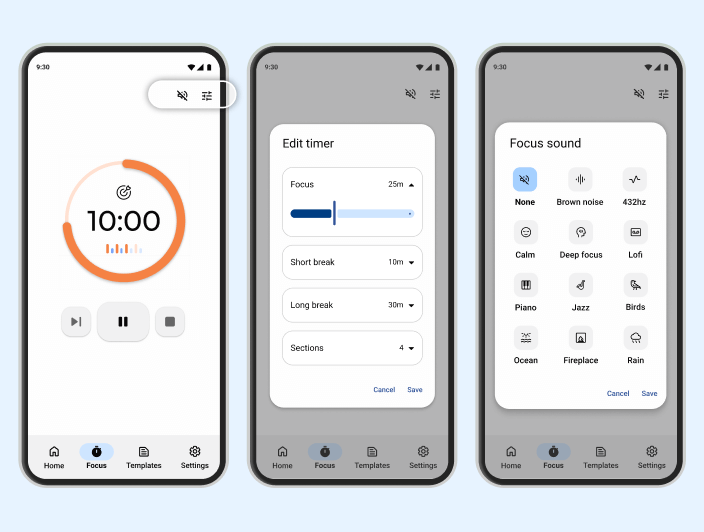
ADHD focus works best when there is a finish line in sight, even a small one. Planndu’s built-in Pomodoro timer creates exactly that. Work for 25 minutes, break for 5, repeat four times, then take a longer rest.
The reason it works so well is simple. Twenty-five minutes feels manageable enough to actually start. Once you start, the timer keeps you anchored to the task instead of drifting somewhere else. And the scheduled breaks mean your focus gets a real reset instead of slowly burning out across the day.
If 25 minutes feels too short for deeper work, you can adjust the timer in Planndu to whatever interval fits. Some people do 40 minutes, some go up to 50. The length matters less than the structure. Pick a time that feels like a real commitment without feeling impossible, and let the timer do the rest.
Tasks Groups
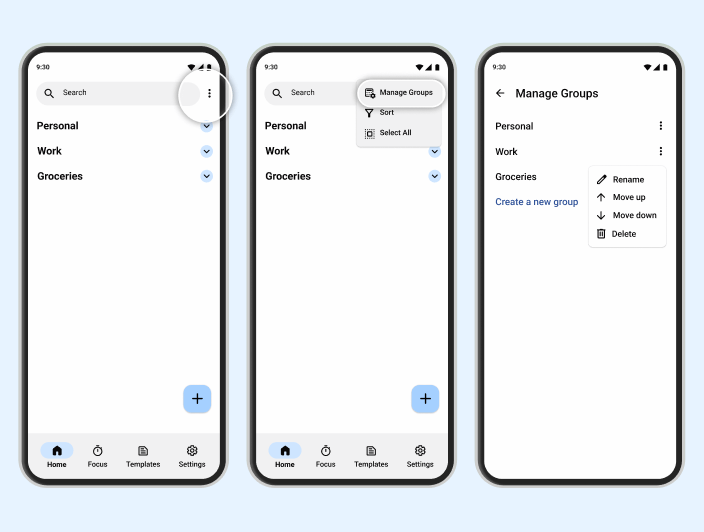
One thing that made a huge difference for me was using groups. Instead of one giant list of everything, Planndu lets you group tasks by project, area, or whatever makes sense for your life. Work tasks in one group. Personal in another. A specific project gets its own space.
This matters more than it sounds. A mixed list with fifty items from every corner of your life creates visual noise that is genuinely overwhelming. Grouped tasks feel contained. You open the work group when you are in work mode. You close it when you are done. Your personal tasks are not staring at you during a meeting. Your work tasks are not making you anxious on a Sunday evening.
A good way to start is to create no more than four or five groups. Too many and you are back to the same problem. Think in broad areas first, work, personal, health, side projects, and refine from there.
Templates
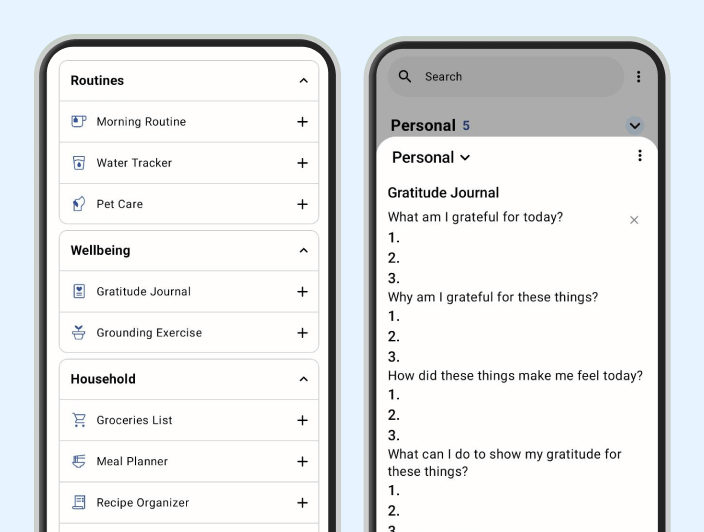
Starting is the hardest part. Planndu’s templates eliminate the problem entirely. Instead of facing a blank list, you open a template and the first steps are already there waiting for you.
Build one for anything you do more than once a month. Weekly planning, project kickoffs, recurring reports, monthly admin, anything that has a predictable shape. The version of you who built that template was probably having a decent day with enough focus to think it through properly. Think of it as that version of you leaving instructions for the version of you who wakes up scattered and overwhelmed.
There is no single system that works for everyone with ADHD, and that is completely okay. The whole point is to try things, and use something that fits. Maybe color coding changes everything for you. Maybe it’s the Pomodoro timer that finally makes focus feel manageable. Maybe it is just having your tasks grouped and prioritized in one place instead of scattered across three apps and a notes app you forgot existed. Whatever works for you is the right answer. If you want to start somewhere, Planndu brings all of it together in one place and is free to download on the App Store and Google Play.