Some updates add a button or fix a bug. This one is a whole new app. The new Calendar is now live in Planndu 3.1.0, and it’s the biggest change we’ve shipped so far. Along with it: calendar sync, a home screen widget, a Kanban view for tasks on iPad, and a fresh look ahead of the Planndu desktop app.
Here’s everything, piece by piece.
A calendar you can move around
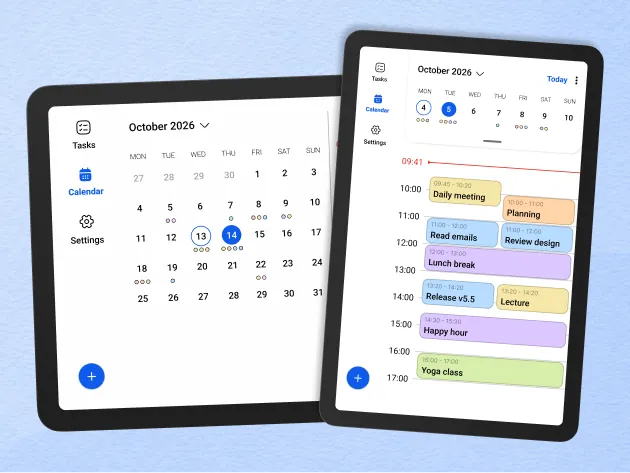
Planndu had a Calendar screen before. It worked but it wasn’t as flexible, the events couldn’t be dragged around like your tasks. So we rebuilt it from scratch. The new Calendar is designed to make planning more interactive and flexible.
Here’s what that gets you:
- Drag and drop rescheduling. Need to move a meeting? Grab it and drop it at a new time.
- Edit events directly. Tap an event to view its details and make changes.
- Quick scheduling. Tap a time slot to add an event for that specific period.
- Landscape and iPad support. Full week view, more days visible at once, bigger event cards.
- Google Calendar and Apple Calendar sync. Events from Google and Apple now sit next to your Planndu tasks in one view.
Your whole day is in one view, so you’re not jumping between apps to keep track of it.
Your task list is a Kanban board now (on iPad)
The Tasks list got some real work done on it:
- Drag and drop, rebuilt. The old version had some glitches in specific devices. Those are fixed.
- You see where a task will land before you drop it. While you’re dragging, a preview of the task shows its future position.
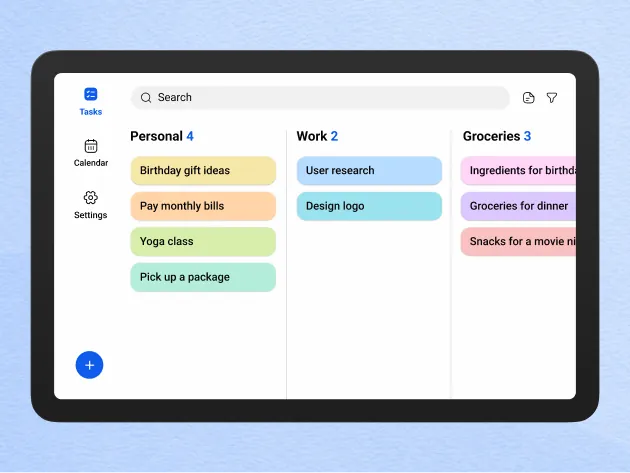
- Kanban layout on iPad and in landscape mode. Tasks show up as columns e.g. To Do / Today / Done, or grouped by priority.
- Bigger screens get better treatment. On iPad and in landscape, the list is now optimized to fill the display.
Besides that the portrait task list is unchanged.
A calendar widget for your home screen
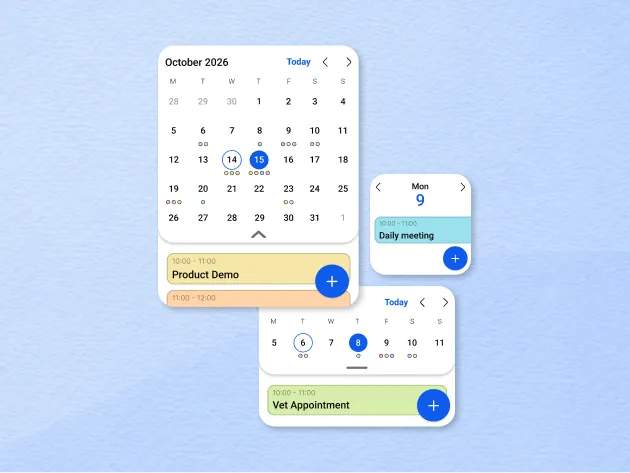
Sometimes all you need is just need to know what’s next as quickly as possible.
With the new Calendar widget, you can see your schedule right from your home screen. Check upcoming events and see what’s planned for each day all without opening the app.
Better reminders for your daily routine
The new version includes more recurring task options to help you build routines. Repeating tasks on specific days is particularly useful for habits and activities that only apply on certain days.
Supported for both iOS and Android.
Templates moved, nothing was deleted
To make room for Calendar in the bottom menu, Templates now lives in the top-right corner of the main screen. Same templates, but new location.
Whole new look
You’ll notice Planndu looks a bit different. As part of the rebrand, we replaces all icons and changed the pallete. It’s a a groundwork for the Planndu desktop app, which is in active development.
The goal is simple: Planndu wherever you plan: phone, tablet, and soon desktop too.
If something you need is missing from the new Calendar, let us know. Update your app, drag an event around, and let us know what you think.
Until next time! ❤️